
国外能用国内的app吗?2026世界杯+日常追剧,一篇搞定海外无缝访问攻略

You’re in a Paris apartment, scrolling through WeChat trying to watch your cousin’s wedding video, but the screen freezes with a “region not supported” message. Or you’re in San Francisco, craving the latest episode of Nirvana in Fire 2 on iQIYI, only to get a buffering loop that never ends. So—国外能用国内的app吗?The answer is yes, but not without the right tool: a reliable 回国加速器 (return-to-China accelerator). This article breaks down why region restrictions exist, what features to look for in an accelerator, and how Tomato Accelerator solves these pain points—including a step-by-step look at using it to watch the 2026 US-Canada-Mexico World Cup live from overseas.
Why Can’t You Access Domestic Apps Overseas?
Most Chinese apps like Tencent Video, Youku, or Honor of Kings restrict access outside China due to copyright laws or licensing agreements. Even if you can open the app, the cross-border network latency (the time it takes data to travel from your device to Chinese servers) makes streaming or gaming unbearable. For example, a WeChat video call from London to Beijing might have a 3-second delay, or a live sports stream could buffer every 10 seconds. That’s where a 回国 accelerator comes in: it routes your internet traffic through a server in China, making apps think you’re accessing them from within the country, while also reducing latency.
Key Features to Look for in a 回国 Accelerator
Not all accelerators are created equal. Here are the non-negotiable features you need—and how Tomato Accelerator checks every box.
Global Nodes & Smart Optimal Route Recommendation
Tomato Accelerator has a vast network of nodes across North America, Europe, Asia, and Oceania. When you open the app, it automatically scans all available nodes and picks the one with the lowest latency for your location. For instance, if you’re in Sydney, it might connect you to a node in Singapore first, then to a Shanghai server—cutting down on the time data takes to travel. This smart routing means you get a stable connection without manually switching nodes.
Multi-Platform Support & Multi-Device Sync
Whether you use an iPhone, Android phone, Windows laptop, or Mac, Tomato Accelerator has an app for every platform. Even better: one account lets you use up to 5 devices at the same time. Imagine this: you’re using your laptop to work on a Chinese document, your phone to watch a drama on Youku, and your tablet to play Honor of Kings—all connected to Tomato. No need to buy separate subscriptions for each device.
Stable Unlimited Data & Specialized Lines for Video & Games
Nothing ruins a binge-watch like hitting a data cap or throttling. Tomato offers unlimited data, so you can stream 4K dramas or play games for hours without worrying. It also has dedicated lines for popular apps: “影音专线” (video lines) for iQIYI, Tencent Video, and CCTV Sports, and “游戏专线” (game lines) for PUBG Mobile and Honor of Kings. Each line comes with 100M独享带宽 (exclusive 100M bandwidth), meaning you won’t have to compete with other users for speed—even during peak hours like weekend evenings.
Data Security & Encrypted 专线传输
When accessing sensitive apps like Alipay or WeChat Pay from overseas, security is a top concern. Tomato uses military-grade encryption for its 专线传输 (dedicated line transmission), so your data is never intercepted or leaked. Whether you’re paying bills or sharing personal photos, you can trust that your information is safe.
24/7 After-Sales Support from Professional Tech Team
What if your connection drops right before a live World Cup match? Tomato’s tech team is available 24/7 via chat or email. They’re experts in solving cross-border network issues—so you can get back online in minutes. No more waiting for business hours or dealing with automated responses.
2026美加墨世界杯: Watch Live from Overseas with Tomato Accelerator
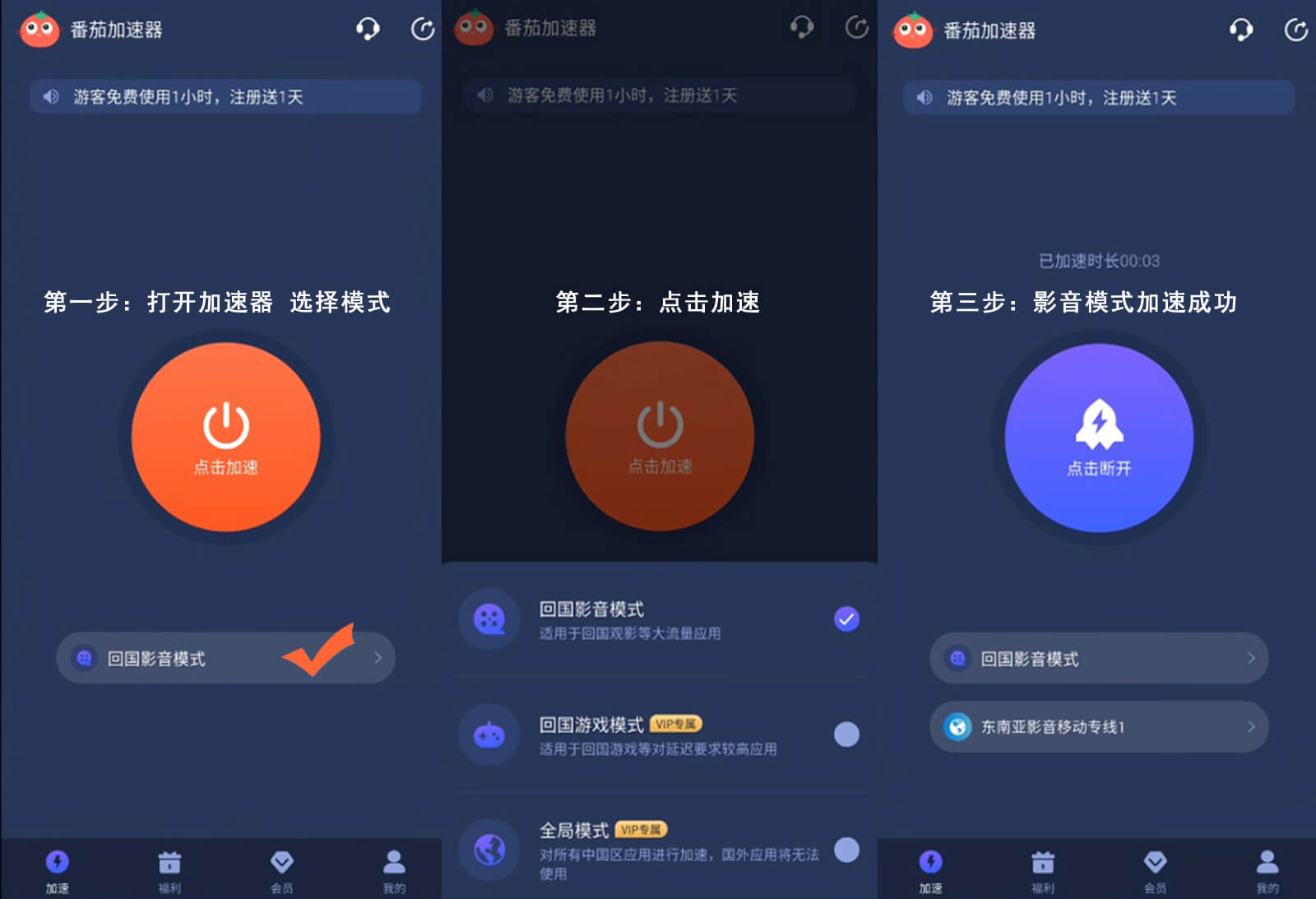
Let’s fast forward to 2026. You’re in Mexico City, excited to watch the Chinese national team’s first match in the World Cup. Normally, CCTV Sports (the official broadcaster in China) is region-locked, but with Tomato Accelerator, here’s how you do it:
1. Open the Tomato app on your phone or laptop.
2. In the “Specialized Lines” section, select “CCTV Sports” (it’s marked with a football icon).
3. Tap “Connect”—the app will automatically pick the best node for live sports streaming.
4. Open the CCTV Sports app or website. You’ll see the live match start playing in 4K, with zero buffering. Even if the match goes into extra time, the connection stays stable.
You can even cast the stream to your TV using Chromecast or AirPlay—since Tomato supports multi-device sync, your phone can stay connected while you watch on the big screen. No more missing a goal because of a bad connection.
How to Get Started with Tomato Accelerator
Getting set up is easy. First, go to Tomato’s official website (make sure it’s the verified one to avoid fake apps) and download the app for your device. Sign up for an account—they offer a 3-day free trial so you can test it out. Once you’re logged in, the app will show you a list of popular apps and services (like WeChat, iQIYI, and CCTV Sports). Select the one you want to use, tap connect, and you’re ready to go. It takes less than a minute—no technical skills needed.
Final Thoughts
So, going back to the question: 国外能用国内的app吗?Absolutely—if you have a reliable accelerator like Tomato. Whether you’re a student missing home dramas, a worker needing to access Chinese work tools, or a sports fan gearing up for the 2026 World Cup, Tomato has you covered. Its global nodes, multi-platform support, unlimited data, secure transmission, and 24/7 support make it the go-to choice for overseas users. Don’t let region restrictions stop you from staying connected to home—try Tomato Accelerator and enjoy seamless access to all your favorite Chinese content.